The browser you are using is not supported. Please consider using a modern browser.

Crash Course in Image Resolution: Vector vs. Raster Artwork
Crash Course in Image Resolution: Vector vs. Raster Artwork
Ever sent in your logo for custom t-shirts, only to hear it’s not high enough resolution?
You’re not alone. Artwork requirements can trip up even the savviest custom apparel shoppers. Terms like vector files, raster images, DPI, and PPI might sound like alphabet soup—especially when all you want is your logo on a shirt. The good news? You don’t need a graphic design degree to get the basics down. Understanding the difference between vector and raster artwork saves time, prevents blurry prints, and helps your custom apparel look sharp. At Charm City Screen Print, we review customer artwork daily. Here’s what you need to know before sending in your next design.
Vector vs. Raster Artwork: What’s the Difference?
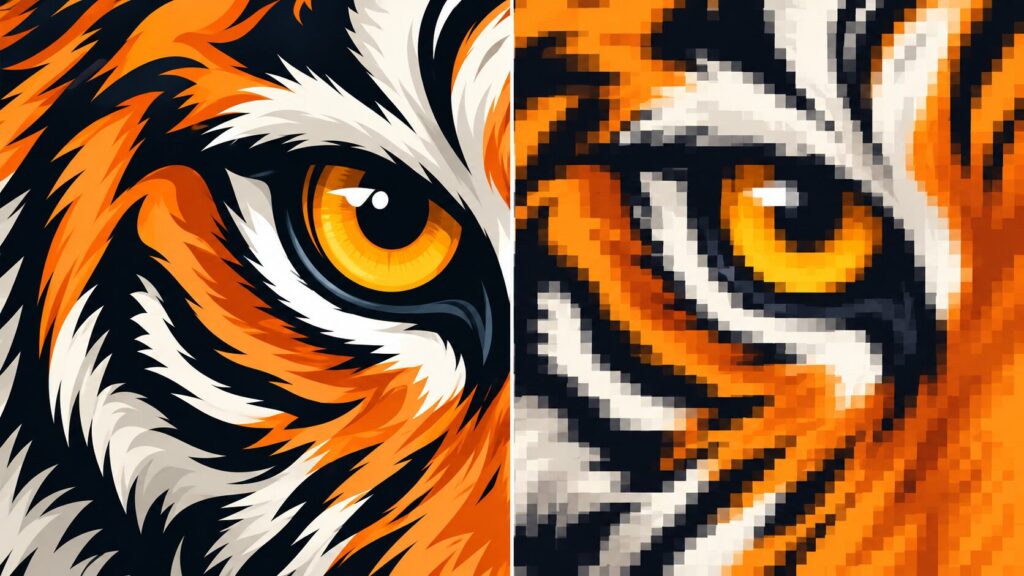
Vector and raster artwork differ in how they create images. Raster images use pixels, while vector artwork uses mathematical paths and shapes. That difference matters when it’s time to resize your image for printing. For example, a small raster logo may look sharp on your computer screen. However, enlarging it for a full-size t-shirt design could make it blurry. A true vector logo grows or shrinks without losing sharpness in its shapes and lines.
Here’s a quick comparison:
| Feature | Vector Artwork | Raster Artwork |
| Made from | Paths and shapes | Pixels |
| Scalability | Scales without losing quality | Limited by pixel dimensions |
| Common formats | AI, EPS, SVG, PDF | JPG, PNG, TIFF, PSD |
| Best for | Logos, text, illustrations | Photos, detailed images |
| Screen printing | Often preferred | Works with sufficient quality |
| Embroidery | Useful starting point | May require more preparation |
| File size | Often smaller for simple designs | Depends on dimensions and compression |
Both formats have their place in custom apparel, but vector artwork usually offers more flexibility for logos and graphic designs.
1. What Is Raster Artwork?
Raster images contain thousands or millions of tiny colored squares called pixels. All those pixels team up to create the image you see on your screen. Most photos and images you work with every day are raster files.
Common raster file formats
- JPG/JPEG: Popular for photographs and online images.
- PNG: Supports transparency and works well for digital graphics.
- GIF: Commonly used for simple web graphics and animations.
- TIFF: Often used for high-quality image files.
- PSD: Adobe Photoshop’s native file format, which can contain editable layers.
Most photos snapped on your phone, screenshots, and images pulled from websites are raster files.
Why can raster images become blurry?
Raster images come with a fixed number of pixels. Enlarge a small image, and you’re just stretching those same pixels over a bigger space. That’s why the image can lose sharpness or develop jagged edges. For example, a logo that’s only 400 pixels wide might look fine on a website. However, it may not contain enough detail for a large screen printed design. Bottom line: Raster artwork can work for printing, but only if it has enough resolution for the size you want.
2. What Is Vector Artwork?
Vector artwork uses mathematical paths instead of pixels. These paths define shapes, curves, lines, and other design elements. That’s why vector graphics scale to almost any size without losing clarity. That’s why designers often create logos and illustrations as vector artwork.
Common vector file formats
- AI: Adobe Illustrator files.
- EPS: A common format for sharing vector artwork.
- SVG: Scalable Vector Graphics, often used for logos and web graphics.
- PDF: Can contain editable vector artwork, depending on how the file was created.
Keep in mind, not every PDF is a vector file. Some PDFs are just raster images in disguise.
Why is vector artwork better for logos?
Vector artwork offers several advantages for custom screen printing.
For example, it allows us to:
- Resize artwork without losing sharpness.
- Maintain clean lines and edges.
- Adjust individual design elements when the file allows editing.
- Prepare artwork for different print sizes.
- Work more easily with solid colors and separated design elements.
Imagine ordering shirts with a small left-chest logo and a large version of the same logo on the back. With properly prepared vector artwork, both sizes can maintain crisp edges. Bottom line: Vector files are usually the best starting point for logos, lettering, and graphic designs.
3. How Can You Tell if Your Logo Is Vector or Raster?
Not sure what kind of artwork you have? Start by checking the file extension. Files ending in JPG or PNG are raster images. On the other hand, AI, EPS, and SVG files usually contain vector artwork. But file extensions don’t always tell the whole story. For example, you can drop a low-resolution JPG into an Illustrator file and save it as an AI document. That trick doesn’t magically turn your image into vector artwork.
Try zooming in
Open your artwork and zoom in on a detailed area. If the edges become noticeably pixelated, you’re probably looking at raster artwork. If the edges remain smooth, the image may be vector-based. This test isn’t perfect since some programs show previews differently. Still, it gives you a helpful first clue.
Ask your original designer
If someone professionally designed your logo, ask whether they have an original vector file. They may have an AI, EPS, SVG, or vector PDF available. These files usually work much better for custom printing than a logo copied off your website.
4. DPI vs. PPI: What Do They Mean?
DPI and PPI often cause confusion when customers prepare artwork for custom apparel. Although people sometimes use these terms interchangeably, they describe different measurements.
What is PPI?
PPI stands for pixels per inch. It describes how many image pixels occupy one inch at a particular output size. For example, an image that’s 3,000 pixels wide would have a resolution of 300 PPI when printed 10 inches wide. However, if you print that same image 20 inches wide, the effective resolution drops to 150 PPI. That matters because increasing print size spreads the available pixels across a larger area.
What is DPI?
DPI stands for dots per inch. It typically refers to the density of physical dots a printer produces.
While DPI describes an aspect of printer output, PPI describes image resolution at a given size.
When prepping artwork for custom apparel, you’ll often hear “300 DPI” thrown around. In most cases, what people really mean is 300 PPI at the final print size.
What resolution is best for screen printing?
For most raster artwork, 300 PPI at the intended print size is a solid starting point. However, different designs and printing methods may have different requirements. Some artwork may print successfully at a lower resolution. Other designs may need additional preparation. Vector artwork sidesteps these issues since its paths aren’t limited by pixel resolution. Not sure if your file is ready? Our team can review it before production.
5. Why Does My Logo Look Blurry When Printed?
A logo can look perfectly clear on a computer screen but become blurry when enlarged for custom apparel. Several common issues can cause this.
You downloaded the logo from a website
Websites often display smaller versions of images to improve loading speeds. That means a logo saved from your website might not have enough detail for a large print. Whenever possible, use the original artwork instead.
The image is too small
A low-resolution image may not have enough pixels for the intended design size. Enlarging the image won’t bring back missing details. Although some software can improve the appearance of enlarged images, it can’t guarantee an accurate reconstruction of the original artwork.
The image has compression artifacts
JPG files use lossy compression, which removes some image information to reduce file size. Repeatedly editing and saving a JPG can introduce additional distortion. That can leave you with fuzzy edges or weird artifacts around your logo.
You’re working with a screenshot
Screenshots are convenient, but they usually aren’t ideal for professional printing. Screenshots usually have limited resolution and often include unwanted backgrounds or extra visual clutter.
You don’t have the original artwork
Over time, organizations often collect several versions of their logos. One employee might have a PNG, another might have a screenshot, and someone else might have an old JPG. Unfortunately, none of these files may match the original design quality. Our advice: Always send the highest-quality original artwork you can find.
6. What File Format Is Best for Screen Printing?
The best file format depends on your design. Still, vector artwork is usually preferred for custom screen printing, especially for logos, text, or illustrations.
Why do screen printers prefer vector files?
Screen printing requires artwork that can be prepared for the printing process. Vector files make it easier to work with individual colors, clean edges, and precise design elements. They’re particularly helpful for:
- Company logos
- Team graphics
- School spirit wear
- Bold lettering
- Multi-color illustrations
- Branded merchandise
Can you screen print a PNG or JPG?
Yes! You don’t always need vector artwork to order custom t-shirts. High-quality raster files can work well, especially when they contain enough resolution and detail for the intended print size.
However, smaller images may require additional artwork preparation. For example, a big, high-resolution PNG beats a tiny logo pulled from a website every time. The important thing isn’t just the file format—it’s the quality of the artwork inside. Learn more about our custom screen printing services in Maryland.
7. What Artwork Files Work Best for Embroidery?
Embroidery has different artwork requirements than screen printing. Instead of applying ink to fabric, embroidery machines create designs using thread. Before production, an embroidery design must be converted into machine-readable stitch instructions. This process is called digitizing.
Why does embroidery artwork need digitizing?
A logo file tells us what the design should look like. However, an embroidery machine also needs instructions for stitch direction, density, sequence, and other details. Digitizing creates those instructions.
Can you embroider a JPG or PNG?
Yes. Both raster and vector artwork can serve as references for embroidery digitizing. Clean, high-quality artwork always makes the process easier. Some designs may also need adjustments. For example, extremely small text, thin lines, and intricate details may not translate well into stitches. Simplifying these features helps create a cleaner finished logo. At Charm City Screen Print, we can help determine whether your artwork is suitable for embroidery. Explore our custom embroidery services.
8. Why Do Transparent Backgrounds Matter?
Have you ever seen a logo saved inside a white rectangle? That white area may simply be part of the image file. When prepping artwork for custom apparel, a transparent background makes your design much easier to work with.
What’s the benefit of a transparent background?
A transparent background allows the artwork to appear without an unwanted background color. This helps when placing logos on garments of different colors. For example, a logo with a transparent background can appear directly against a navy, black, or red shirt in a digital mockup. But transparency alone doesn’t guarantee a print-ready file. The image still needs enough resolution, clean edges, and proper artwork preparation.
Which file formats support transparency?
Several formats support transparent backgrounds, including:
- PNG
- SVG
- AI
- PSD
- Certain PDF files
JPG files do not support transparency. If you’re exporting a logo from a design program, choose a transparent background when appropriate. Remember, transparency and resolution are two different things.
9. Why Should You Keep Your Original Logo Files?
Your original logo files are business gold. They make it easier to create consistent branding across different products and marketing materials. For example, the same logo might appear on:
- Custom t-shirts
- Embroidered hats
- Employee uniforms
- Hoodies and sweatshirts
- Promotional merchandise
- Business signs
- Marketing materials
Having the original vector artwork saves time when you need to adapt your branding for different uses.
What should you request from your designer?
If you’re having a logo professionally designed, ask for:
- The original editable artwork file
- A vector version of the logo
- A transparent PNG for everyday use
- Full-color and single-color versions
- Your brand’s official color information
It also helps to keep these files in a shared spot where your team can actually find them. That way, you won’t have to hunt for the right logo every time you order custom apparel.
10. Artwork Checklist: What Should You Send Your Screen Printer?
Before you send in your design, take a minute to review your files. Here’s a simple checklist to help you prepare.
- Original artwork: Use the original design files whenever possible.
- Vector version: Include an AI, EPS, SVG, or suitable vector PDF if available.
- High-resolution images: Make sure raster artwork has enough detail for your desired print size.
- Clean background: Remove unwanted backgrounds from the artwork.
- Correct colors: Let your printer know if specific brand colors matter.
- Intended print size: Explain how large you want the design.
- Decoration method: Specify whether you want screen printing, embroidery, or another method.
- Design placement: Tell us where the artwork should appear on the garment.
Don’t stress if you can’t check every box. Our team can help you figure out what your artwork needs before printing starts.
Frequently Asked Questions About Artwork for Custom Printing
Is vector or raster better for screen printing?
Vector artwork is usually the preferred choice for logos, text, and illustrations because it scales without losing quality. However, high-resolution raster images can also work well for custom printing.
Can you turn a JPG or PNG into a vector file?
Yes, but simply changing the file extension won’t work. The artwork must be recreated or traced into vector shapes. Complex designs may require additional cleanup to maintain accuracy.
Is a PNG file good enough for screen printing?
A PNG can work well if it has sufficient resolution at the intended print size. However, a small PNG downloaded from a website may not contain enough detail for a large design.
What resolution should my logo be for printing?
For many raster files, 300 PPI at the final print size is a good starting point. However, the ideal resolution depends on the artwork and decoration method.
Is a PDF always a vector file?
No. A PDF can contain vector artwork, raster images, or a combination of both. The file’s contents determine whether it can scale without losing quality.
Can you embroider a logo from a JPG?
Yes. A JPG can serve as reference artwork for embroidery digitizing. However, a clear, high-quality image makes it easier to reproduce the logo accurately.
Does saving a low-resolution image at 300 DPI improve quality?
No. Changing the resolution setting without adding actual image detail doesn’t automatically improve quality. The image needs enough pixels for its intended print dimensions.
What if I don’t have a vector version of my logo?
You can still request custom apparel! Send us the best-quality artwork you have. Our team can review the file and help determine what preparation it needs.
Need Help Preparing Artwork for Custom Apparel in Baltimore?
You don’t need to know everything about graphic design to order great custom apparel. Still, knowing the basics of vector vs. raster artwork helps you dodge common printing problems. Vector files offer flexibility for logos and illustrations. Meanwhile, high-resolution raster images work well for photographs and other detailed designs. The most important thing? Start with the best artwork you can get your hands on. At Charm City Screen Print, we help businesses, schools, nonprofits, organizations, and clothing brands throughout Baltimore and Maryland prepare artwork for professional custom apparel. Ordering screen printed shirts, embroidered hats, employee uniforms, or branded merch? Our team can review your files and recommend the next steps. Not sure if your logo is ready for printing?
Send us your artwork and tell us about your project. We’ll help you pick the right decoration method and get you ready for a great finished product.
Connect With Charm City Screen Print
Looking for custom apparel inspiration? Follow Charm City Screen Print for our latest printing projects, embroidery work, and behind-the-scenes shop content.
- Instagram: @charmcitysp — See our latest prints, embroidery projects, and shop updates.
- Facebook: Charm City Screen Print — Explore recent projects, company updates, and custom apparel ideas.
- LinkedIn: Charm City Screen Print — Discover business apparel ideas, branding tips, and industry insights.
Charm City Screen Print
12128 B Long Green Pike
Glen Arm, MD 21057
Glen Arm, MD 21057
Phone: (410) 592-2394